What's New: Technology for Learning Blog

My thoughts: Internet memes are are common marketing tool these days. The latest popular one you may have heard about is Charlie Charlie. If you are not familiar with it then please read these recent articles in the Independent and Telegraph. It looks like this may be linked to a forthcoming horror movie called The Gallows. Keeping up-to-date with these trending social media items is a full-time job and our students use sophisticated webs of social interactions and tools to gain access, share and discuss them. As a parent you can use them to your advantage to start conversations with your children about aspects of life that simple day-to-day interactions may not explore. Questions you could discuss with your children are:

My thoughts: every year we welcome new students, parents and teachers into the Patana Community and inevitably there are physical and emotional issues that we all face when relocating. In this post The Mediatrician gives practical advice on how to help your children (and ultimately yourself) deal with the transition....
Source: cmch.tv/since-moving-teen-spends-time-connecting-with-old-friends-through-media/

My thoughts: The guidelines given on the site below are common sense and well worth a read. Some parents establish an informal contract with their children and their allotted screen time - this is also a worthwhile exercise since the children have ownership in determining the dos and don'ts and are more likely to adhere to them. Bottom line is we are all role models, and showing an interest in everything your child does (virtual or not) is the key ingredient.
Source: www.commonsensemedia.org/blog/how-to-set-screen-rules-that-stick
Our thoughts: the contents of the image below have been circulating amongst our students over the past few days within their social networks on their mobile devices, and will no doubt cause anxiety, stress & fear. It would be a good idea to talk in advance with your children about what steps they should follow if they receive an email like this. There breadth of issues classified within e-safety are considerable, but can be categorised into three areas of risk:
1) content: being exposed to illegal, inappropriate or harmful material
2) contact: being subjected to harmful online interaction with other users
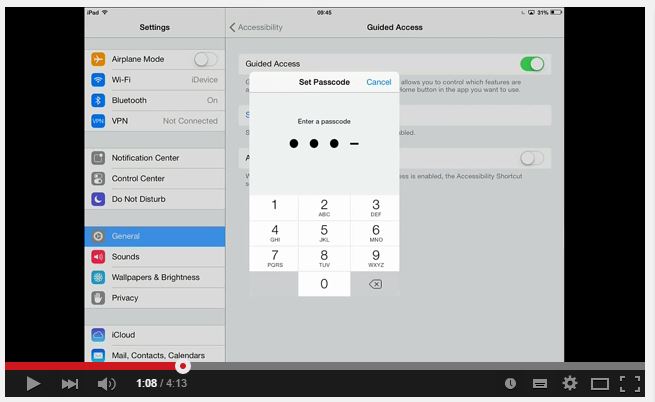
Thoughts: If you're like me the temptation to hand over your iPhone or iPad to your restless children when in a restaurant, airport, back-of-the-car etc can be simply too much. What you can do though is turn that opportunity into a learning experience. With a well chosen, fun, entertaining and ultimately educational app locked down so that your children cannot navigate out or purchase things via the apps store your conscience is assuaged. Watch the video from Mitch on how to set-up guided assess on your ios device.
Link: www.youtube.com/watch?v=6HC99ydRnhQ&feature=youtu.be