What's New: Technology for Learning Blog
The Oculus Go arrived from the US yesterday (much cheaper to ship than buy locally). I must say I am impressed with the quality for the $199 price tag. Just playing around with its potential as a learning resource at the moment. Lots of fun. This was tricky to set up, but having the image you are seeing wirelessly displayed to another screen is certainly work it.
Here are the instructions: pixvana.com/sharing-your-oculus-go-screen-on-your-laptop/
This is a great resource to support VR content creation by learners: www.edu-create.com/home
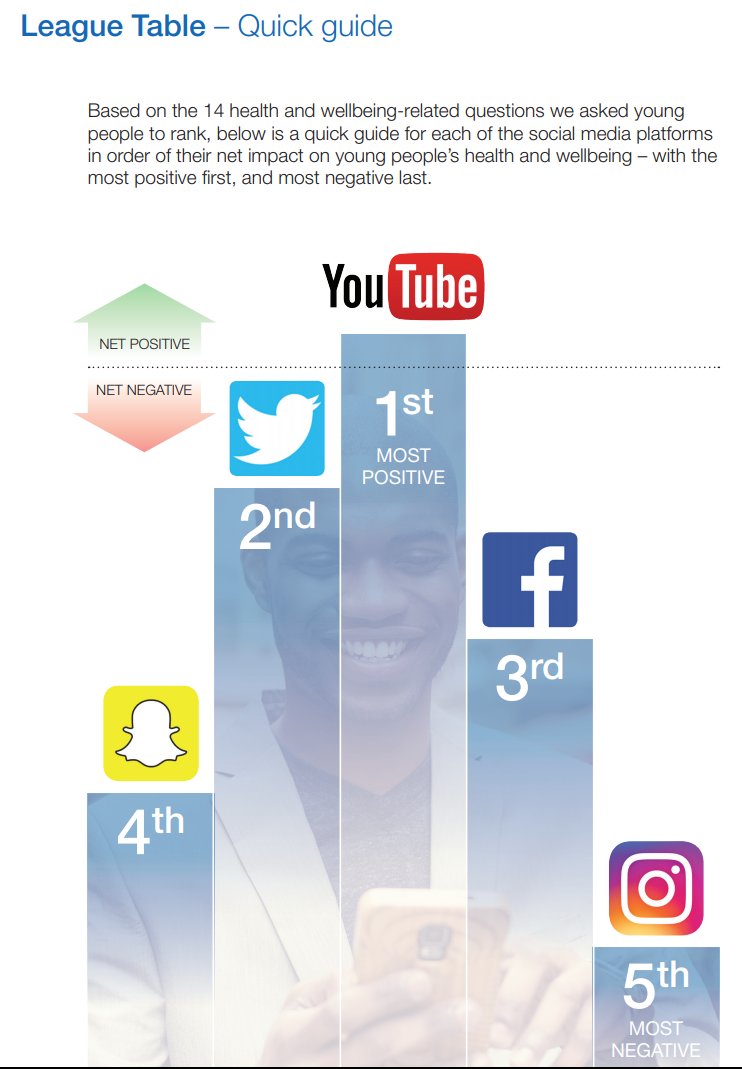
I had several conversations with delegates at the Librarian conference on Saturday about the use of YouTube as a resource. The data represented in the 'Social media and young people's mental health and wellbeing' report was of particular interest as one of the pieces of information I put on display.
Question: How much do young people turn to YouTube for advice and support?
Question: Does the YouTube algorithm of suggested videos help or hinder somebody seeking help?
Sal Flint asked me a long time ago to present at the Library Knowledge & Sharing Workshop on Digital Hygiene. I think it went well....

#106: Turn an old smartphone into a security camera
Do you remember the baby shark eggs we had in the lounge area? Last term in the foundation stage we set up a GoPro camera to take photos of the turtles laying their eggs. Like many families I’m sure you have one or two old mobile phones sitting in the ‘out-of-sight-out-of-mind’ drawer. I do and when the boys found a new nest in the garden before the summer we set up an old iPhone to watch the weaver bird feed it’s chicks without disturbing them. Sadly I don’t have any photos or video from the even; the memories are good enough. The free app I used to live-stream from an old phone to my new one is one of the tips in the 4Ts today.
Yesterday we set up the Digital Citizenship area for the Librarians' Knowledge & Sharing Workshop and I had forgotten how much fun it was to use the 360 camera. We will invite attendees at the workshop to take 360 photos of themselves and play around with them using VR goggles. We will then take their details and email them the 360 photo. Just a bit of fun, but when you add the ability to hotspot the 360 photo (or video) (using ThingLink for example) then you can amplify the learning. Here are some examples the staff have made previously (tip: use your mouse or touchscreen to navigate the photo and click on a link):